About
Bone: The Great Cow Race is the second episode in Telltale Games' adventure series adapting Jeff Smith's acclaimed Bone comics, following the first game, Bone: Out from Boneville (2005). Built on the Telltale Tool engine, it adapts the comic's second volume as the Bone cousins get caught up in a rowdy spring-fair cow race. It was one of Telltale's earliest titles before the studio's breakout with Sam & Max; the series was never continued because Telltale lost the Bone license. The games were delisted from Steam following Telltale's 2018 closure.
Screenshots


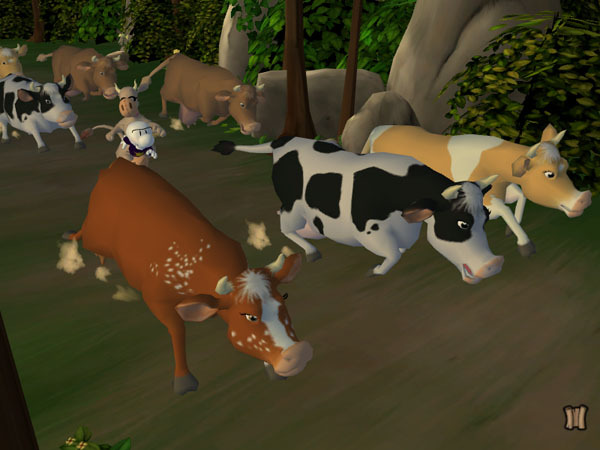
Official store screenshots from Steam — deckport links them, never rehosts. Hover to pause; click to preview.
Identity
Launch
- Binary
- Bone2v20.exe
- Needs files
- none beyond the binary
Proton
- Version
- GE-Proton
- Winetricks
- —
- ProtonDB
- ProtonDB Platinum runs flawlessly
⚙ Setup notes
Game: Delisted Steam game (appid 8320), a Telltale Tool point-and-click adventure. ProtonDB lists platinum, but on low confidence (only a handful of reports) — treat as promising rather than proven; this is why status is needs-test.
Proton: Run with GE-Proton (proton_experimental also works). Binary is Bone2v20.exe (the install folder also contains a Bone2.exe, but Bone2v20.exe is the v2.0 launcher).
DRM: The English release ships with SoftwarePassport/Armadillo copy protection; that DRM doesn't run on modern Windows/Proton, so a community no-CD/loader fix placed beside the exe is the usual way to get it launching. (Some non-English builds, e.g. the Czech/Polish releases, shipped without it.)
Display: Native game is 4:3 only — use the Telltale Custom Resolution Tool to force a wider mode, otherwise it pillarboxes (fine on the Deck's 16:10 panel).
Install: deckport only configures the prefix; it never bundles or links the game files.
The one thing to know
Supply your own copy. deckport links nothing.
Status: Delisted single-player adventure; ProtonDB lists platinum but on low confidence (only a few reports), so treat it as promising, not proven (status needs-test = config confirmed against community evidence, not yet hands-on by us).
Controller: This is a mouse-driven point-and-click with NO native gamepad support — play it with a Steam Input mouse/trackpad+keyboard layout (right trackpad as mouse, a button mapped to left-click); that covers the whole game.
DRM: English build uses SoftwarePassport/Armadillo protection, so a no-CD/loader fix next to Bone2v20.exe is typically needed before it will launch under Proton.
Display: Optional widescreen via the Telltale Custom Resolution Tool.
Community guides
Write-ups and threads from people who got this (or a similar) game running. deckport links to them — it doesn't reproduce them.
Get the artwork
deckport never hosts game images. Open this game on SteamGridDB, pick
the cover / hero / logo / icon you like, and drop them into the
game folder under .deckport-art/ before you push it to the
Deck. The importer files them under the right names automatically.
Run it on your Deck
Two files: the one-time importer (deckport.py) in your
Deck's home folder, and this game's install helper. Copy the game
into ~/Games and run the helper with Steam closed — it
writes the recipe (binary, launch options, Proton version)
and registers the shortcut with artwork.